Basic Notes About ReactJs
The Virtual DOM
What is the DOM?
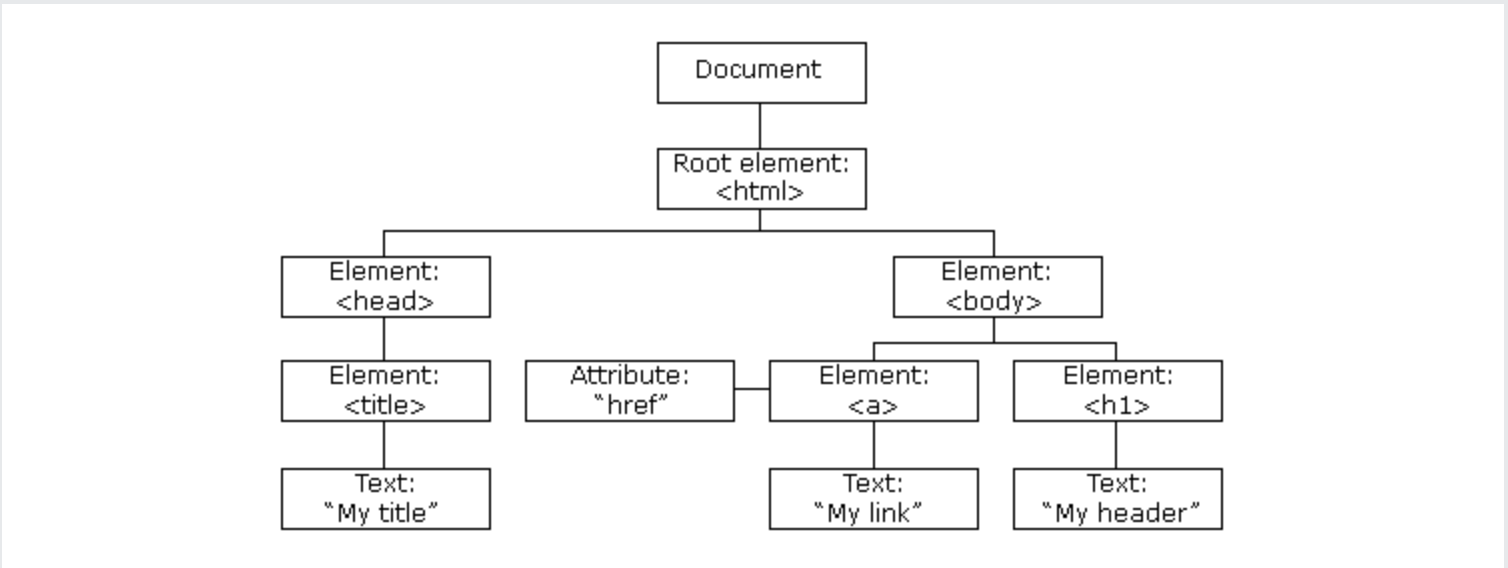
The DOM (Document Object Model) is a tree-like structure that represents the content of a webpage.
When you load a webpage in your browser, the browser creates a DOM of the webpage.
What is the Virtual DOM?
The Virtual DOM is a lightweight, in-memory copy of the actual DOM. It’s like a blueprint of the real DOM, where each UI element is a node.
Why use the Virtual DOM?
The Virtual DOM in React is like a draft version of a webpage. React makes changes to this draft first, then smartly updates only the parts of the real webpage that need to change. This makes your webpage update faster and more efficiently.
React Limitations
It’s a Library, Not a Full Framework
React only covers the UI components, making it dependent on third-party libraries. This can cause versioning clashes when scaling the app due to dependencies
JSX
JSX stands for JavaScript XML (Extensible Markup Language). It’s a syntax extension for JavaScript, used primarily in React.
What is JSX?
JSX allows us to write HTML-like syntax in our JavaScript code. This makes the code easier to read and write.
How does it work?
JSX is not understood by the browser. So, it’s transformed into regular JavaScript using a transpiler like Babel.
Why use JSX?
JSX lets you write HTML-like markup inside a JavaScript file, keeping rendering logic and content in the same place.
It simplifies the creation of complex UIs.
Props
What is props?
“props” is an abbreviation for properties, which allow for the passing of data from one component to another.
How are props used?
Let’s imagine you’re building a website for a pet store. You have a component called Pet that displays information about each pet.
Here’s how you might use props to give information to the Pet component:
<Pet name="Fluffy" type="Cat" age="2" />
In this example, name, type, and age are all props. You’re telling React that you want to use the Pet component, and you want the pet’s name to be “Fluffy”, the type to be “Cat”, and the age to be “2”.
Inside the Pet component, you can access these props like this:
const Pet = (props) => {
  return (
    <div>
      <h2>{props.name}</h2>
      <p>Type: {props.type}</p>
      <p>Age: {props.age}</p>
    </div>
  );
}
destructuring
const Pet = ({name, type, age}) => {
  return (
    <div>
      <h2>{name}</h2>
      <p>Type: {type}</p>
      <p>Age: {age}</p>
    </div>
  );
}
In this function, props is an object that holds all the values you passed in. So props.name is “Fluffy”, props.type is “Cat”, and props.age is “2”. The Pet component uses these values to decide what to render.
Are Props Read-Only?
Yes, props are read-only. This means that a component cannot change its props, but it can only read and use them.
Functional Component
In React, components are the building blocks of your application.
There are two types of components:
- class components
- functional components
With the introduction of Hooks in React 16.8, functional components have become more powerful and flexible.
What is a Functional Component?
A functional component in React is a JavaScript function that returns a React element.
React components are regular JavaScript functions, but their names must start with a capital letter or they won’t work!
It accepts an object of properties, often referred to as props, and returns what should appear on the screen.
Here’s a simple example of a functional component:
const Welcome = (props) => {
  return (
    <h1>Hello, {props.name}</h1>
  );
}
Using State in Functional Components
Before React 16.8, functional components were stateless, meaning they couldn’t hold or manage local state.
But with the introduction of the useState Hook, you can now use state directly in a functional component.
Here’s an example:
import React, { useState } from 'react';

const Counter = () => {
  const [count, setCount] = useState(0);

  return (
    <div>
      <p>You clicked {count} times</p>
      <button onClick={() => setCount(count + 1)}>
        Click me
      </button>
    </div>
  );
}
Using Effects in Functional Components
The useEffect Hook allows you to perform side effects in functional components. It accepts a function that contains the side-effect logic.
Here’s an example:
import React, { useState, useEffect } from 'react';

const Example = () => {
  const [count, setCount] = useState(0);

  useEffect(() => {
    document.title = `You clicked ${count} times`;
  });

  return (
    <div>
      <p>You clicked {count} times</p>
      <button onClick={() => setCount(count + 1)}>
        Click me
      </button>
    </div>
  );
}
State and Lifecycle
state
“state” is like a component’s memory. It remembers stuff like what you type or what you click.
import React, { useState } from 'react';

function Counter() {
  // Here we use the "useState" hook to create a new state variable called "count"

  // The "setCount" function is used to update the state

  const [count, setCount] = useState(0);

  return (
    <div>
      <p>You clicked {count} times</p>
      <button onClick={() => setCount(count + 1)}>
        Click me
      </button>
    </div>
  );
}

export default Counter;
lifecycles
Every React component goes through the same lifecycle methods:
- mounting: when an instance of a component is being created and inserted into the Dom
- updateing: when a component is being rendered as a result of changes to either its props or state
- unmounting: when a component is being removed from the Dom
- Error handling: when there is an error during rendering in a lifecycle method or in the constructor of any child component
Effects
The useEffect hook in React is a built-in function that allows you to perform side effects in your components.
Side effects could be anything that interacts with the world outside of the scope of the current function being executed.
Some examples of side effects are fetching data, directly updating the DOM, and timers.
The useEffect hook accepts two arguments: a function and an optional array of dependencies.
- The function contains the side effect logic,
- the dependencies array tells React when to re-run the side effect.
Here are some examples of how useEffect can be used:
- Without any dependency passed, the effect runs on every render.
useEffect(() => {
  // Runs on every render
});
- With an empty array as the second argument, the effect runs only on the first render.
useEffect(() => {
  // Runs only on the first render
}, []);
- With props or state values in the dependencies array, the effect runs on the first render and any time any dependency value changes.
useEffect(() => {
  // Runs on the first render
  // And any time any dependency value changes
}, [prop, state]);
Refs
“refs” is short for references. They provide a way to access DOM nodes or React elements created in the render method.
In React, when the state of a component is updated, it triggers a re-render of that component and its child components.
However, when the ref of a component updates, it does not trigger a re-render of the component.
Imagine you’re writing a letter and you want to refer back to something you mentioned earlier. You might say “refer to paragraph 2”.
In React, refs work in a similar way. They allow you to “refer” back to something - in this case, a particular element in the DOM.
import { useRef } from 'react';

function MyComponent() {
  const myRef = useRef(null);

  function handleClick() {
    myRef.current.focus();
  }

  return (
    <>
      <input ref={myRef} />
      <button onClick={handleClick}>Focus the input</button>
    </>
  );
}
In this example, useRef is used to create a ref (which is like a “bookmark” for a DOM node), and then that ref is attached to an input element by passing it into the ref prop. When the button is clicked, the handleClick function is called, which focuses the input element.
import React, { useState, useEffect, useRef } from 'react';

export default function App(){
  const [name, setName] = useState(') //useState() causes re-render.
  const renderCount = useRef(1) //{ current: 1 }

  //useRef() DOESN'T cause re-render

  useEffect(() => {
    renderCount.current = renderCount.current + 1;
  })

  //useEffect() runs AFTER render

  return (
    <>
      <input value={name} onChange={e => setName(e.target.value)}/>
      <div>My name is {name}</div>
      <div>I rendered {renderCount.current} times</div>
    </div>
  )
}
Context
“context” is a feature that allows you to pass data directly to components at any level of the component tree, without having to pass it down through props.
This can be particularly useful for data that needs to be accessible by many components throughout an application.
import React, { createContext, useContext } from 'react';

// Create a Context object
const MyContext = createContext(defaultValue);

function MyComponent() {
  // Use the useContext Hook to access the context
  const contextValue = useContext(MyContext);

  // Now you can use the context value in your component...
}
In this example, createContext is used to create a new context. The useContext hook is then used to access the value of the context.
In summary, context provides a way to share values like these between components without having to explicitly pass a prop through every level of the tree.